1. How do I know if your Monitor Mount is Compatible with my monitor?
A. Check the weight of your monitor and see if it is below the max rated load of the mount you are looking at.
B. Check the size of your monitor and confirm if it is in the size range of the mount.
C. Check the VESA pattern of your monitor and confirm if it is 75x75mm/100x100mm if yes it should fit.
D. If you have no VESA hole pattern on your monitor you will need a EGMUA4 Non VESA adaptor kit.
What if my monitors bolt pattern is wider then your 100 x 100mm VESA pattern?
You will need an adaptor plate to install the monitor to the mounts or stands.
,
2. Can this monitor stand be mounted on a MDF/particle board desktop?
Yes. However, the particle board is softer than a solid wood or MDF desk top. We suggest you purchase a reinforcing plate (EGDA1) for installation.
,
3. Can this monitor stand be mounted on a glass table?
Yes. But in order to protect the glass table,we suggest you should purchase a reinforcing plate (EGDA1) for installation.
,
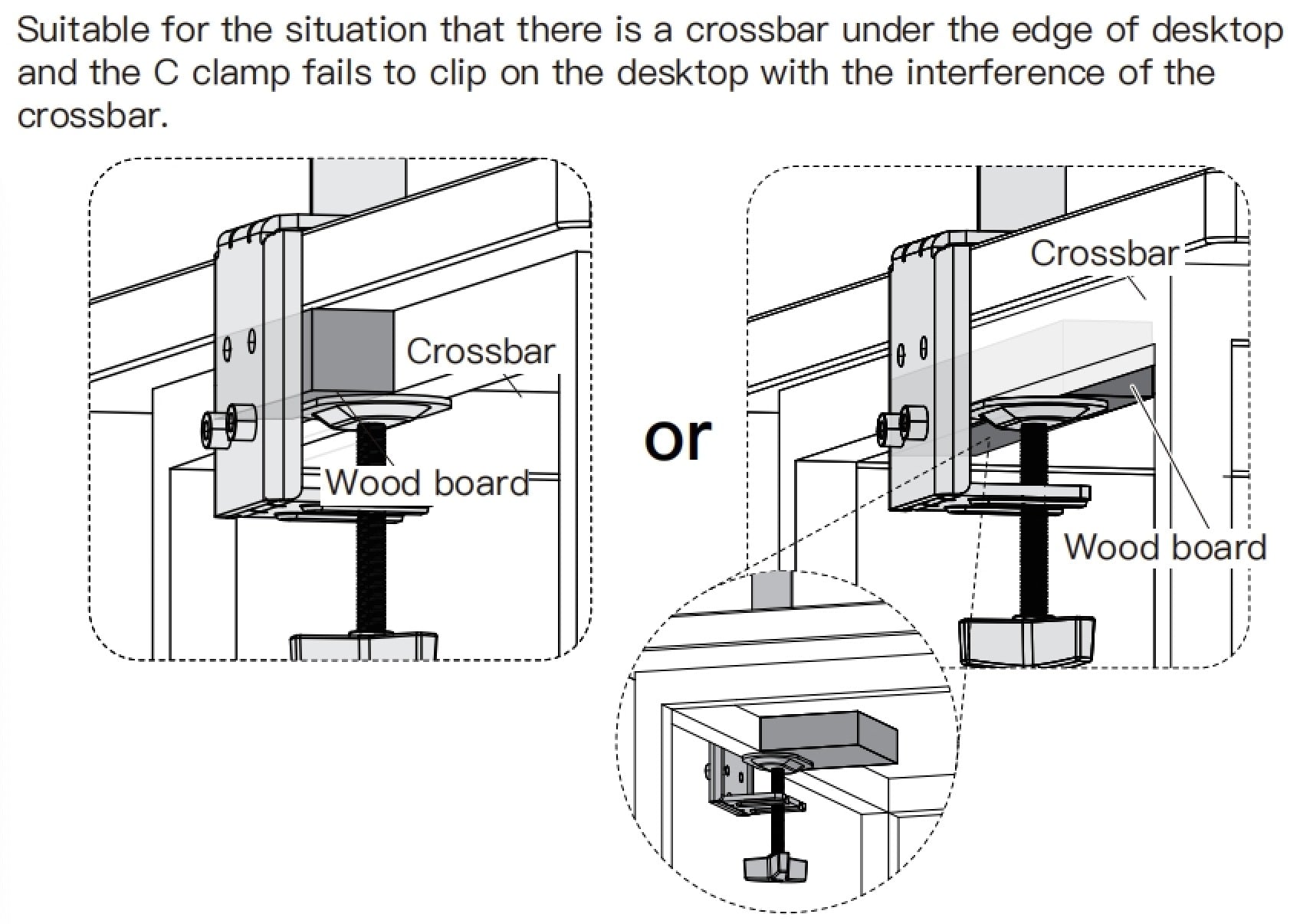
4. There is a crossbar under the edge of my desk, How can I install the mount?
There are two methods for installation.
a.Please place a wooden block with the same size of the crossbar under your desk.
b.Or you can also use grommet mounting method to install the stand.
,
5. Is there any way to make the monitor stand a little higher?
If you have a thin table,you could try to place a wooden block between the tabletop and the c-clamp, which will add a few inches of height.

,
6. What should I do if the part that connects the monitor to the stand is skewed?
Our monitor mounts & stands come with a 360°rotation function on the head. If the head is skewed please mount the monitor first and then directly rotate it back to the right angle.
(BTW, If the mount is not attached to a desktop, it will be difficult to rotate the VESA plate by hand).

,
7. The vesa plate is too big/wide. How to install it if the monitor has a round on the back or vesa size is only 75x75mm?
We recommend that you use spacers and long screws M4x30mm to install.
First, fix the spacers inside/outside the mounting hole , then attach the VESA plate, and finally fix it with M4x30mm screws.
,
8. What should I do if the tension adjustment screw is blocked by the arm?
a. Mount your monitor to the mount or stand first, the arm needs weight to form some gravity, press down to open the adjustment points. Continue to apply pressure to the arm gradually and the arm should go down to a horizontal angle in order to access the gas spring adjust bolt.
b. If you find it difficult to press the arm into the horizontal position, you could try making an angle between the two arms and try it again, this may help.

,
9. Why does the arm slide down and cannot be fixed?
Please kindly check the screw direction of the connector ring. Since the ring hole is threaded on one side and unthreaded on the other side, the screw needs to be screwed from left to right.

,
10. What should I do if the left and right monitors cannot be aligned?
Please note there is a bolt on the top of the vesa for monitor level adjustment.You can remove the nut and turn the bolt with the supplied
allen key to raise or lower the monitor a few inches, and install the nut after the adjustment.

,
11. How to solve the problem that the gas spring arm bounce up and cannot be lowered?
If you want to lower the monitor, please use the large allen key to keep turning the screw clockwise ("-" direction) to reduce arm tension until the monitor can hold itself at the desired height. If your monitor is light, please turn the screws several times. (One turns ≈ 1lbs)
,
12. How to solve the problem that the gas spring arm sags and cannot be lifted?
Firstly, please hold the gas spring arm to a horizontal position. Then use the large allen key to keep turning the screw counterclockwise ("+" direction) continuously to increase the arm tension according to the weight of your monitor until the monitor can maintain at the desired height. (One circle ≈ 1lbs)
,
13. How to solve the problem of monitor arm shaking?
There are set screws on the outside of the joints of each monitor arm, just retighten these screws to fix it.
,
14. How to solve the problem of arm drift after the monitor stand is installed?
a. First, tighten the set screws at each joint.
b. If the monitor arm still drifts after tightened the set screws, we suggest that you could disassemble the arm to check whether the set screw is stuck in the seam, as shown in the picture. If so, turn the plastic cover indicated by the arrow in the picture to avoid the screw getting stuck seam.
c. If you have tried the above methods and the problem still exists, then you can disassemble the set screw to see if the screw inside is relatively short, or directly replace a screw with a size of M6x15mm screw to tighten the arm.

,
15. Can the monitor wall mount be mounted on drywall/plasterboard?
No, the monitor wall mount can only be installed on single wooden stud, concrete and brick walls.
,
16. Can the monitor wall mount be mounted to a metal stud?
No, installing on a metal stud may cause the mount to fall.